
The Problem With Linear Surveys
Most research surveys are built the same way they were in 1995: a flat list of questions, top to bottom, identical for every respondent. Whether you're a power user or someone who's never heard of the product, you see the same 47 questions in the same order.
The result? Three predictable failures:
- Irrelevant questions annoy participants. When a respondent who selected "I've never used this product" is then asked to "rate the onboarding experience on a scale of 1-5," you've broken trust. Completion rates drop. The data you do get is contaminated by frustration.
- One-size-fits-all surveys produce one-size-fits-all insights. You can't explore the specific pain points of enterprise users and solo practitioners in the same flat survey without making both groups answer questions that don't apply to them.
- Unqualified respondents dilute your dataset. Without screening, you're analyzing responses from people who were never part of your target audience — and you won't know which ones until it's too late.
These aren't minor annoyances. They're structural flaws that undermine the validity of your qualitative research. And they're entirely solvable.
What Is Adaptive Survey Design?
Adaptive survey design is the practice of building surveys that change shape based on who's taking them. Instead of a static questionnaire, you create a dynamic instrument that:
- Screens out respondents who don't meet your criteria before they waste their time (or yours)
- Branches into different question paths based on earlier answers
- Shows or hides entire sections depending on respondent characteristics
- Follows up on specific answers with deeper qualitative probes
Think of it as the difference between a form and a conversation. A form asks the same questions regardless of context. A conversation adapts based on what the other person just said.
This isn't a new concept in survey methodology — conditional logic has existed in tools like Qualtrics and SurveyMonkey for years. What's new is applying it specifically to qualitative research surveys where the goal isn't statistical significance but rich, contextual understanding.
The Four Building Blocks of Adaptive Surveys
1. Screener Questions: Your First Line of Defense
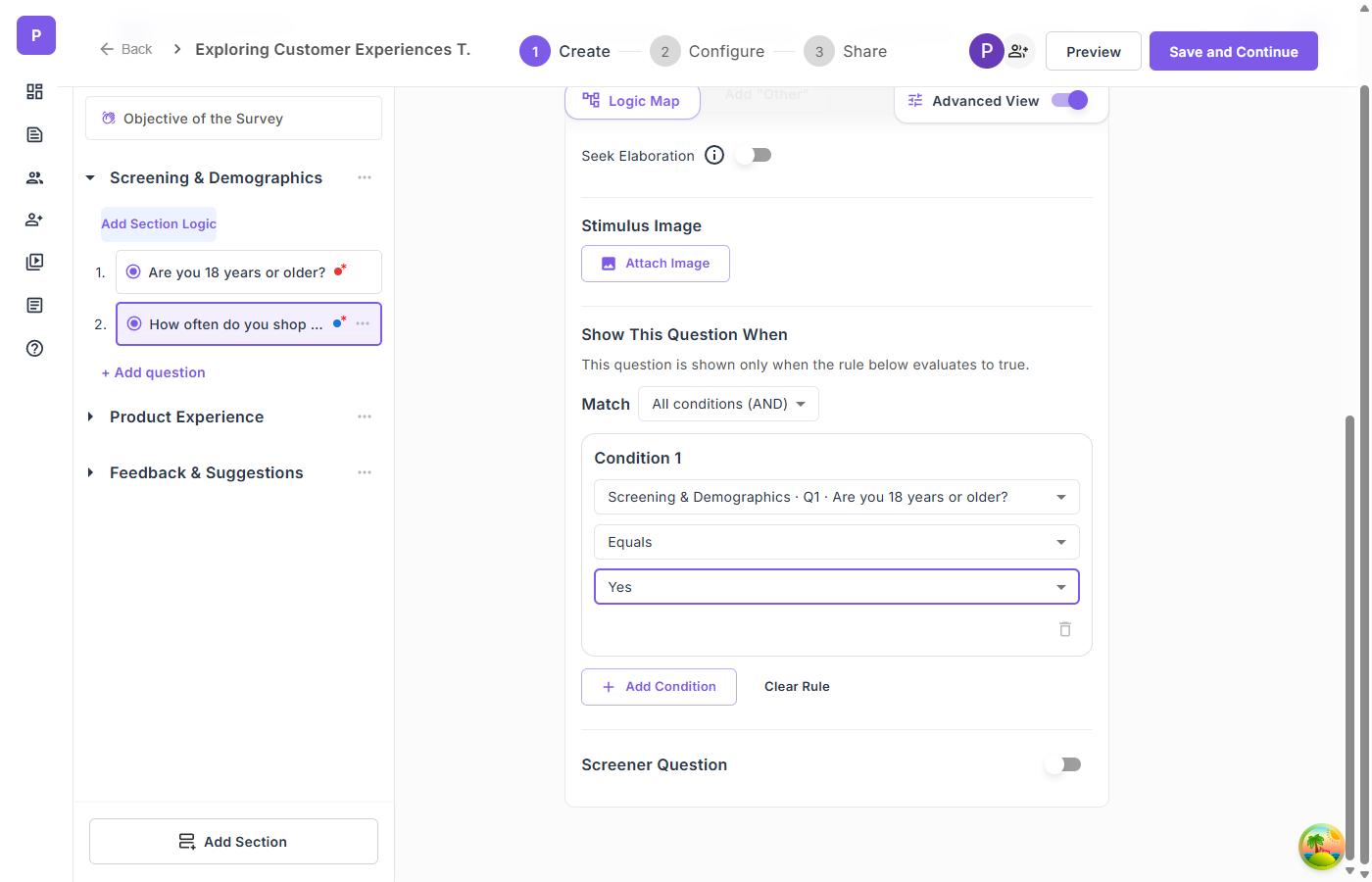
Screener questions act as gatekeepers. They evaluate a respondent's answers against criteria you define — and if someone doesn't qualify, they exit the survey immediately.
When to use screeners:
- Demographic targeting — You're researching healthcare professionals and need to filter out non-clinical respondents
- Experience-based filtering — You want feedback only from people who've used a specific feature in the last 30 days
- Consent verification — Participants must agree to study terms before proceeding
- Geographic targeting — Your research focuses on specific markets
How screeners work in practice:
You create a multiple-choice question — say, "Which of the following best describes your role?" — and mark certain answers as disqualifying. If a respondent selects a disqualifying option, they're redirected out of the survey when they attempt to proceed.
The key is placement. Put screeners in the first section. There's no point collecting 10 minutes of data before discovering the respondent doesn't meet your criteria.
Design tip: Keep screener sections short and direct. A respondent who gets screened out should have a quick, respectful experience — ideally under 60 seconds. If you're using a panel provider, configure a redirect URL for screened-out participants so they get routed back cleanly.
2. Question-Level Branching: Show the Right Questions to the Right People
Question-level branching controls whether an individual question appears based on answers to earlier questions. This is the most granular form of adaptive logic.
Example scenario:
You're researching how teams collaborate on documents. Question 5 asks: "Which collaboration tools do you use regularly?" with options like Google Docs, Notion, Confluence, Microsoft Word, and Other.
With branching, you can:
- Show a follow-up about real-time co-editing only to respondents who selected Google Docs or Notion
- Show a question about version control challenges only to Microsoft Word users
- Show a question about integration pain points only to Confluence users
Each respondent sees only the questions relevant to their workflow. No one wastes time on irrelevant items. And your data for each tool is clean — it comes only from actual users of that tool.
Operators matter. Good branching systems support multiple condition types: equals, not equals, contains, greater than, less than, is empty, is not empty. This lets you build precise rules. "Show this question when Age > 25 AND Role equals Manager" is a different audience than "Show this question when Role does not equal Intern."
Combining conditions: For complex research designs, you'll need AND/OR logic. "Show this section when the respondent selected BOTH 'enterprise user' AND 'IT department'" requires all conditions to be true. "Show this question when the respondent selected 'frustrated' OR 'very frustrated'" requires any condition to be true.
3. Section-Level Branching: Create Entirely Different Survey Paths
While question-level branching shows or hides individual questions, section-level branching controls entire survey sections. This is how you create fundamentally different experiences for different respondent segments.
Example scenario:
You're running a customer satisfaction study across three product lines. After the screener section identifies which product the respondent uses, you branch into three completely different section paths — each tailored to that product's specific features, common complaints, and use cases.
The participant experience is seamless. A respondent who qualifies for Product A sees "Section 1 of 3" — they never know that two other paths exist. The section counter updates dynamically. A 5-section survey that skips 2 sections shows "Section 1 of 3" instead of "Section 1 of 5."
This is particularly powerful for multi-segment research where you need to cover different topics for different user types but want to run a single study rather than creating and managing three separate surveys.
4. Seek Elaboration: Turning Quantitative Responses Into Qualitative Depth
Here's where adaptive survey design becomes genuinely transformative for qualitative research.
Most surveys treat open-ended questions as static text boxes. The respondent types something, and that's it — whether they wrote a thoughtful paragraph or three words.
Seek Elaboration changes this dynamic. When enabled on an open-ended question, the system reads the respondent's initial answer and prompts them for more detail based on what they actually said. It's the survey equivalent of an interviewer saying, "That's interesting — can you tell me more about that?"
Why this matters for qualitative data quality:
Traditional open-ended survey responses average 15-25 words. They're surface-level. "The onboarding was confusing" tells you almost nothing actionable.
With adaptive follow-up, that same respondent might elaborate: "The onboarding was confusing because the tutorial assumed I already knew how to set up integrations. I spent 20 minutes looking for a Slack connection that turned out to be in a completely different settings menu."
Now you have a specific, actionable insight about information architecture and integration discoverability.
Designing Adaptive Surveys: A Practical Framework
Step 1: Map Your Respondent Segments
Before building anything, identify the distinct respondent types you expect and what you need from each. Create a simple matrix:
| Segment | Screening Criteria | Unique Questions | Shared Questions |
|---|---|---|---|
| Power users | Used product 5+ times/week | Feature depth, workarounds | Satisfaction, NPS |
| Casual users | Used product 1-4 times/month | Discovery, barriers | Satisfaction, NPS |
| Churned users | Cancelled in last 90 days | Reasons for leaving, alternatives | Initial expectations |
This matrix tells you exactly where you need branching logic and how many survey paths you're creating.
Step 2: Design Screeners First
Write your screener questions before anything else. For each disqualifying condition, document:
- The question text
- Which answer(s) disqualify
- The redirect behavior for screened-out respondents
Common mistake: Making screeners too lenient. If your research is about enterprise SaaS adoption, screen for company size, role, and product usage — not just "Do you use software?" Be specific enough that your dataset doesn't need post-hoc cleaning.
Step 3: Build the Shared Foundation
Identify questions that every qualified respondent should answer. These form your survey's backbone and enable cross-segment analysis. Place them in the first section after screeners.
Step 4: Create Branching Paths
For each segment-specific section, define:
- The condition that triggers visibility
- The questions within the section
- Whether the section is mandatory or optional
Step 5: Add Qualitative Depth With Open-Ended Follow-Ups
For every section, include at least one open-ended question with Seek Elaboration enabled. This is where your quantitative scaffolding transforms into qualitative richness.
Strategic placement: Put open-ended questions after related closed-ended questions. If you just asked someone to rate their satisfaction with customer support on a grid, follow immediately with "What specific experience shaped your rating?" with elaboration enabled.
Step 6: Visualize and Test
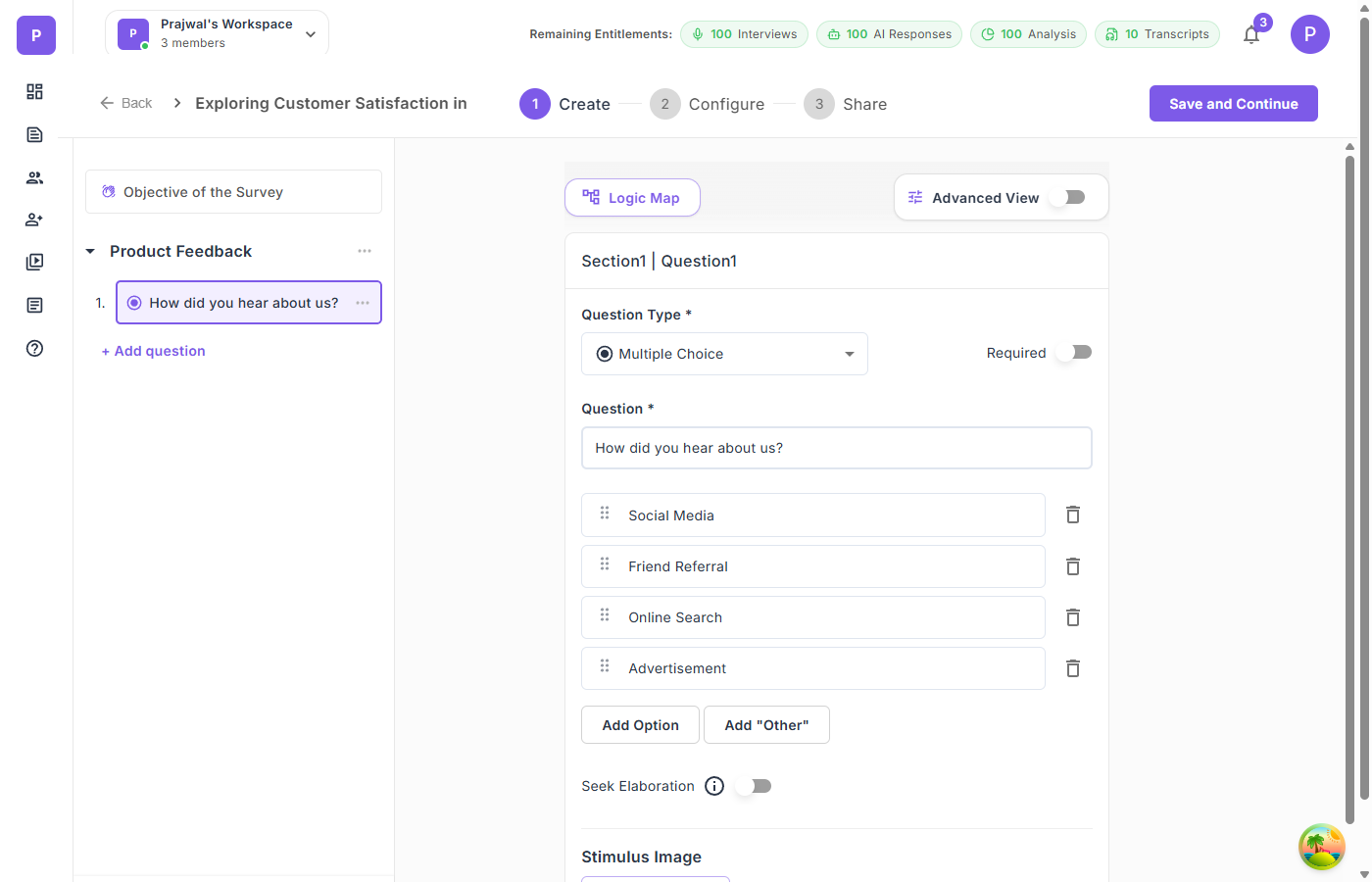
Before launching, review your survey's logic flow. A logic map — a visual flowchart showing all paths, conditions, and screener exits — is invaluable for catching:
- Dead ends — Paths where a respondent can't proceed
- Circular logic — Conditions that reference questions the respondent hasn't seen yet
- Orphaned questions — Questions that are never visible because their conditions are impossible to satisfy
Advanced Techniques for Research Leaders
Grid/Matrix Questions for Multi-Dimensional Evaluation
When you need respondents to evaluate multiple items on the same scale — rating product features, comparing service attributes, assessing brand perceptions — grid questions are more efficient than separate rating questions.
Single-select grids work like Likert scales applied across multiple items simultaneously. "Rate each of the following on a scale from Very Dissatisfied to Very Satisfied: Customer Support, Product Quality, Delivery Speed, Website Experience."
Multi-select grids let respondents check multiple attributes per item. "For each product feature, select all that apply: Easy to use, Reliable, Fast, Needs improvement."
Design tip: Keep grids to 5-7 columns maximum. On mobile devices, wider grids require horizontal scrolling, which tanks completion rates.
Ranking Questions for Priority Discovery
When you need to understand relative priorities — not just what matters, but what matters most — ranking questions force respondents to make trade-offs.
"Rank the following features by importance to you: Real-time collaboration, Offline access, Third-party integrations, Custom templates, Analytics dashboard."
This reveals preference hierarchies that rating scales cannot. In a rating question, respondents can give everything a 4 or 5. In a ranking question, something has to be first and something has to be last.
Design tip: Limit ranking items to 5-8. Beyond that, respondents struggle to meaningfully differentiate between mid-ranked items.
Stimulus Images for Visual Research
When your research involves visual evaluation — product designs, ad concepts, packaging mockups, UI screenshots — attach stimulus images directly to questions. This ensures every respondent evaluates the same visual at the same moment in the survey.
Unlike embedding images in the survey description (which respondents may scroll past), stimulus images are tied to individual questions and display alongside them. This is critical for concept testing, A/B preference studies, and design feedback research.
Measuring the Impact of Adaptive Design
How do you know your adaptive survey is working better than a static one? Track these metrics:
Completion rate. Adaptive surveys with well-designed branching typically see 15-25% higher completion rates compared to static surveys of equivalent length. Respondents who only see relevant questions are less likely to abandon.
Average response length on open-ended questions. With Seek Elaboration, expect 40-60% longer qualitative responses. More importantly, expect more specific responses — details, examples, and context that static text boxes rarely produce.
Data cleaning rate. In static surveys, researchers often discard 10-20% of responses as irrelevant or from unqualified respondents. Screener questions should reduce this to near zero.
Time-to-insight. Because adaptive surveys pre-segment respondents during collection, you spend less time on post-hoc segmentation and data cleaning during analysis.
Common Pitfalls to Avoid
Over-Engineering the Logic
Just because you can create 15 branching paths doesn't mean you should. Every branch adds complexity to your analysis. If you can't articulate why a branch exists in one sentence, remove it.
Forgetting Mobile Respondents
Over 60% of survey responses now come from mobile devices. Test your branching logic on mobile. Test your grid questions on mobile. Test your stimulus images on mobile. If something breaks on a phone screen, it's broken for the majority of your respondents.
Screening Too Aggressively
If your screener criteria are so narrow that 90% of respondents get filtered out, either your targeting is wrong or your criteria are too strict. Aim for a screen-out rate under 40% to keep recruitment costs reasonable.
Ignoring the Screened-Out Experience
Respondents who get screened out are still potential customers, community members, or future research participants. Don't just dead-end them. Configure a polite redirect with a thank-you message. If you're using a panel provider, set up the incomplete redirect URL so they get routed back properly.
The Bigger Picture: Surveys as Conversations
The shift from static to adaptive surveys mirrors a larger shift in qualitative research: from rigid instruments to responsive conversations.
AI-moderated interviews have already shown that research conversations produce richer data when they adapt to the participant. Adaptive surveys bring that same principle to structured data collection — creating instruments that respect participants' time, reduce irrelevant noise, and unlock qualitative depth within a scalable format.
The best research doesn't force participants into predefined boxes. It meets them where they are and follows the thread.
Qualz.ai's Dynamic Survey platform supports branching logic, screener questions, grid/matrix questions, ranking questions, stimulus images, and Seek Elaboration — all configurable through a visual builder with a real-time logic map. Try it free →