Attaching a study
Attaching a study
Once your study has responses, attach it to the conversation and ask questions about the data directly — counts, quotes, tag slices, themes.
How to attach
- Open Research Guide from any dashboard page, or navigate to a specific study and click Discuss with research guide on the study detail view.
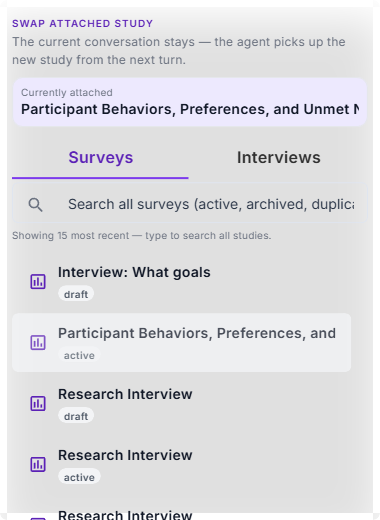
- At the top of the conversation, click Attach next to the title. A picker opens with two tabs: Surveys and Interviews.
- Each row shows the study title and its status so you know what's available before you ask.
- Click a row to attach. The guide confirms, and subsequent answers draw from that study's data.
Search across your workspace
Type a few letters into the search field and matching studies appear. Search covers every study in the workspace, including archived and duplicated ones — useful when you want to ask a comparison question against a study you haven't touched in months.
Swap without losing chat
If a study is already attached and you pick a different one, the conversation is preserved. Only the attached-study pointer changes — the session ID is the same, the agent's context updates in-place, and the next reply references the new data. You can swap back and forth as the conversation evolves.
Attach up to five studies at once (Deep Research)
You can attach up to five studies to one conversation — any mix of surveys and interviews. Attaching a second (or later) study requires Deep Research to be turned on — regular chat is single-study by design, so the "Add another" affordance is disabled until Deep Research is enabled and the picker's tooltip reads "Turn on Deep Research to analyse multiple studies together."
With Deep Research on and multiple studies attached, the guide can:
- Triangulate themes across studies. Ask "what shows up in both of these interviews?" and the guide returns common threads with quoted evidence from each source.
- Flag contradictions. "Where do these two surveys disagree?" surfaces conflicting signals side by side, with participant IDs and response rows pointing at each.
- Run longitudinal comparisons. Attach Q1 and Q2 runs of the same instrument and ask "what moved between these two?" — quarter over quarter, pre- vs. post-launch, cohort over cohort.
- Draft a cross-study report. When the conversation has converged on a narrative, ask the guide to propose a report that spans all attached studies. It comes through as a draft you confirm, just like a single-study draft.
When one attached study is the right move
Attach just one study when you want maximum focus — a deep dive into one cohort, quote-grade answers from one survey, or a single-study summary you'll paste into a brief. Swap the attached study to move from one to the next without losing the conversation.
What swap-in-place unlocks
Because swapping preserves the conversation, you can also stage your thinking one study at a time:
- Focused audience comparison. Attach a SMB-targeted interview study, ask about pricing objections, then swap to the enterprise-targeted study and ask the same thing. The framing stays the same; the answers don't have to.
- Method triangulation. Cross-check a survey's "top concerns" list by swapping to an interview study on the same audience and asking for quoted evidence.
Readiness signals
Some studies are fully ready for conversational analysis; others have partial coverage (embeddings still generating, some transcripts uploaded but not processed). Research Guide surfaces what the agent has to work with, so you know whether to ask a narrow question or a broad one.