Drafting surveys, interviews, AI participants
Drafting studies
When your brief is specific enough, Research Guide proposes a draft. You preview it, confirm, revise, or reject. Nothing is written to your workspace until you confirm.
How drafts appear
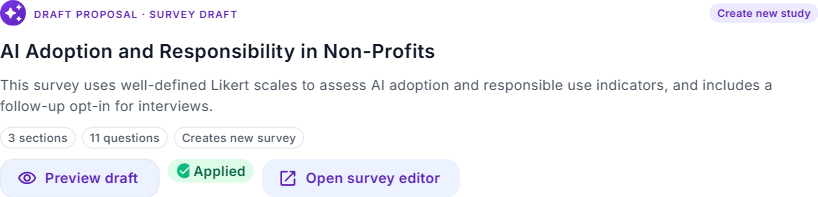
The guide decides when to propose — there's no "draft survey" button to click. Once the conversation has converged on a method, audience, and goal, a draft preview appears inline in your conversation. Each draft preview shows:
- A headline and one-paragraph framing.
- The shape of the study: number of questions, mode (semi-structured, structured), estimated duration.
- Three actions: Preview, Confirm, Revise (the guide refines based on your feedback), Reject (closes the draft and asks why).
Three kinds of drafts
- Survey draft. Question set with recommended types (single-select, open-ended, numeric), tagged with method fit and bias-free wording guidance.
- Interview-guide draft. Research questions, mode (structured or semi-structured), prompts, estimated duration. On confirm, becomes a new qualitative study in your workspace.
- AI-participant plan. Persona description, goals, behavioral constraints. Framed as simulation, not evidence — useful for piloting instruments or testing hypotheses before real fieldwork.
Confirm, revise, reject
- Confirm creates the study in your workspace the same way you'd create it from the dashboard. You land on the study detail page and can edit from there.
- Revise tells the guide what to change ("tighten question 3", "add a screener for new users"). The guide produces a new draft with the revisions applied — previous iterations stay in your conversation for reference.
- Reject closes the draft. The guide asks why so it can tune the next attempt.
What the guide won't propose
Research Guide won't propose if the brief is underspecified — the decision statement is vague, the audience is unclear, or the method doesn't fit the goal. Instead of drafting something weak, the guide asks another focused follow-up. This is intentional: we'd rather miss a proposal than ship a bad one.
Quality bar
Every draft is checked against a rubric covering method fit, question quality, bias-free wording, and how well it covers your brief. If a draft doesn't pass its own bar, the guide flags the issue ("This draft has only 2 open-ended questions — I can add one more if you want deeper qualitative coverage").
Seed the next study from what you just learned
Drafting isn't a one-shot event. Once a study is running (or finished), you can come back to Research Guide with the results attached and say "based on what respondents told us, propose the next study." The guide carries the brief forward — audience, constraints, unresolved questions — and proposes a follow-up that starts from the evidence, not a blank page.
Common moves:
- Survey → interview deep-dive. A survey flagged a segment as dissatisfied. Attach the survey, ask for an interview guide targeted at that segment, and the draft picks up the specific pain points in the open-ended answers.
- Interview → confirmatory survey. A small-sample interview surfaced a hypothesis. Attach the interview study, ask for a validation survey, and the draft converts the hypothesis into measurable questions.
- Study → AI-participant pilot. A human study raised a concept you want to stress-test before running with a wider audience. Ask for an AI-participant plan to probe the concept before fieldwork.
The research doesn't reset between studies — each one builds on the last.